

Executing Parameterized Queries From VBA
When running Parameterized queries from the Access interface, the user is asked to enter the parameter. To accomplish this from VBA, parameter values need to be supplied before the query is executed. There are two distinctly different methods to accomplish this:
- The first method is for Append, Make Table, Update and Delete queries
- The second method is for Select queries with recordsets
A parameterized query appears as follows:
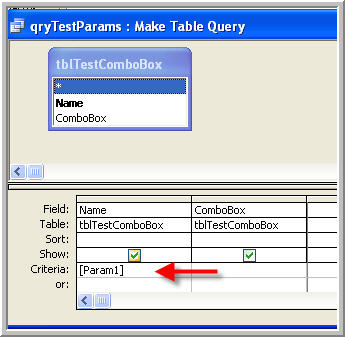
The code to demonstrate how to supply [Param1] from VBA (For Both Types) follows, and it uses the QueryDefs object.
Program Code
Option Compare Database
Option Explicit

Public Sub TestParamQuery()
' ***********************************************************************
' Using Parameters in an Append, Update, Delete or Make Table Query
' ***********************************************************************
Dim qd As DAO.QueryDef
Dim rs As DAO.Recordset

' ***********************************************************************
' Set qd To The Value of an Existing QueryDef
' ***********************************************************************
Set qd = CurrentDb.QueryDefs("qryTestParams")

' ***********************************************************************
' Assign A Value to the Query's Parameter Param1
' ***********************************************************************
qd!Param1 = "A"

' ***********************************************************************
' Execute The Query With a Parameter Value
' ***********************************************************************
qd.Execute dbFailOnError

End Sub

Public Function TestSelectQuery()
' ***********************************************************************
' Using Parameters in a SELECT Query
' ***********************************************************************
Dim db As DAO.Database
Dim rst As DAO.Recordset
Dim qdf As DAO.QueryDef

' ***********************************************************************
' Set Up DB and Query Definitions
' ***********************************************************************
Set db = CurrentDb()
Set qdf = db.QueryDefs("qryTestSelectWithParams")
qdf!Param1 = "A"

' ***********************************************************************
'Now we'll convert the querydef to a recordset and run it
' ***********************************************************************
Set rst = qdf.OpenRecordset

If rst.EOF Then
    rst.Close
    Exit Function
End If

' ***********************************************************************
' Loop Through All The Records Matching Param1
' ***********************************************************************
Do
    MsgBox ("Value is " & rst!Name)
    rst.MoveNext
Loop Until rst.EOF

rst.Close
qdf.Close

Set rst = Nothing
Set db = Nothing
Set qdf = Nothing

End Function

Option Compare Database
Option Explicit

' *****************************************************************************
' Another Example With Error Trapping from a Form
' *****************************************************************************
Private Sub cmdPurge_Click()
' *****************************************************************************
' Sample Code:
' QueryDef To Selectively Delete Employers - The Parameter Value Will Come From
' The Listbox Items Selected By The User
' *****************************************************************************
Dim qd As DAO.QueryDef
On Error GoTo ErrorHandler
Set qd = CurrentDb.QueryDefs("qryPurge_tblEmployeesx")
qd!prmEmployerID = 8
qd.Execute dbFailOnError
Exit Sub

' *****************************************************************************
' Handle Errors
' *****************************************************************************
ErrorHandler:
HandleError Err.Number, Err.Description, "Purge Employers", Me.Name
Err.Clear
Resume Next
End Sub

Private Sub HandleError(intErr As Long, strErrorDescription As String, strFunction As String, strObject As String)
On Error Resume Next
    MsgBox ("Error #------------------  " & intErr & vbCrLf & "Error Description-------- " & strErrorDescription & vbCrLf & _
        "Processing Function---- " & strFunction & vbCrLf & "Error in Access Object--  " & strObject)
End Sub