

Populate Dependent Combo Boxes (Drop Down Boxes) In Access
When selecting the contents from a combo box, it is sometimes useful for the results of the first selection to be used as a filter for the second combo box. For example, suppose the first combo box was a list of purchase orders issued by a clothing manufacturer. After selecting a particular PO, then the clothing style numbers associated with the selected PO would be the only ones to populate the second dependent combo box (instead of all the style numbers from all the purchase orders).
A snippet of the form would appear as follows:
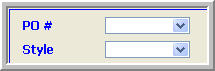
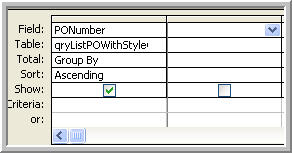
The record source for the PO combo box is a query that groups by PO Number from a purchase order table that contains all the POs and all the styles for each PO. The PO record source query appears as follows:
Once the PO number has been selected by the user, the value of the PO needs to be stored in a global variable visible to modules and other objects outside the form. This code would be triggered by the "After Update" event for the PO combo box.
Private Sub cmbPONumber_AfterUpdate()
' ***********************************************************************
' Store The PO Number Selected In A Global Variables
' ***********************************************************************
If IsNull(cmbPONumber.Value) Or cmbPONumber.Value = "" Then
    Exit Sub
End If

strGlobalSelectedPONumber = cmbPONumber.Value

End Sub
When the user selects the Style combo box, it will show a filtered list of styles associated only with the PO selected in the previous combo box. Filtering for styles associated with just the single selected PO is accomplished by using a row source query that filters on the PO number stored in the global variable:
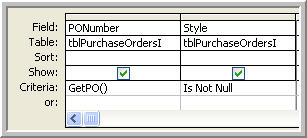
The important item to notice here is that the query contains a function called "GetPO()". This function merely returns the value of the PO which was stored in a global variable as the result of the "After Update" event for the PO combo box. The program code for the GetPO() function (which is a public function contained in a module, not a form) is as follows:
Option Compare Database
Option Explicit

Public Function GetPO()
GetPO = strGlobalSelectedPONumber
End Function
The above function, when called from the criteria section of a query, filters the query results so that only the styles associated with the selected PO are delivered to the Style combo box. In other words, using this technique makes it unnecessary for the programmer to manually construct a SELECT statement with a WHERE clause as the row source for a filtered dependent combo box.
Populate A Combo Box One Entry At A Time
Occasionally you want to populate a Combo Box where the Row Source Type is a Value List instead of a query or table. In cases like this where the content of the Combo Box might change during the use of the application, it needs to be cleared before adding the new values. The code below illustates this method:
Option Compare Database
Option Explicit

Private Sub cmdLoadCombo_Click()
' *****************************************************
' Note That Row Source Type Must Be Set to Value List
' *****************************************************
Dim i As Integer
' *****************************************************
' Remove Previous Entries
' *****************************************************
For i = 1 To Me.cmbTest.ListCount
    Me.cmbTest.RemoveItem (0)
Next i

' *****************************************************
' Add New Entries
' *****************************************************
Me.cmbTest.AddItem "A"
Me.cmbTest.AddItem "B"
Me.cmbTest.AddItem "C"
End Sub